24 Mar 2026
Min Read
Your OCI Logging Data Is Real-time AI Agent Ready
Table of contents
If you're running workloads on Oracle Cloud Infrastructure, you already have something most teams spend months trying to build: a rich, structured stream of operational events flowing continuously through your tenancy.
Audit logs. Function invocation logs. API Gateway traces. Resource lifecycle events. OCI is capturing all of it, right now, in real time.
The question isn't whether you have the data. The question is whether you're putting it to work.
Most teams aren't, at least not for AI agents. They're searching dashboards, writing queries, or waiting for someone to correlate a failed API call with a policy change that happened two minutes earlier. Meanwhile, the operational picture that would let an AI agent answer those questions instantly is sitting untapped in OCI Logging.
This post walks through a reference architecture for turning that data into a real-time AI agent you can have running today. Not as a future project. Today.
The gap between your logs and your answers
OCI gives you genuinely good observability out of the box. Logging Search lets you query across log groups. The Audit console shows you your full change history. Service logs capture function invocations, API Gateway traffic, and more. For most day-to-day operational questions, you can find what you need if you know where to look and have a few minutes to dig. The problem shows up when "a few minutes" is time you don't have.
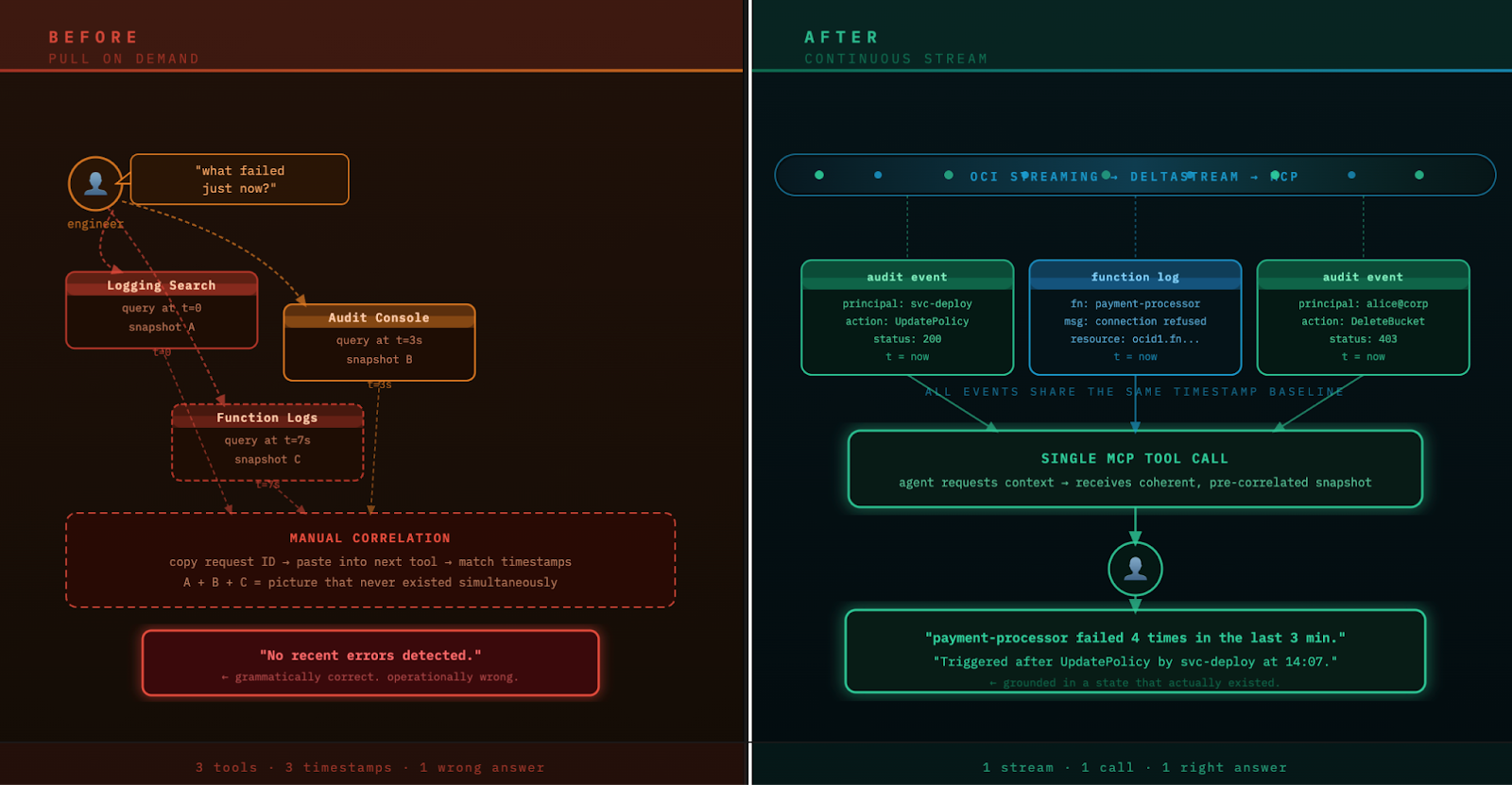
When something goes wrong, the workflow is familiar. You open Logging Search and filter for errors. You switch to the Audit console to see what changed recently. You copy a request ID from one view and paste it into another trying to find the matching event. You pull a timestamp from a function log and go back to the audit trail to see what was happening at that moment across the tenancy. Each tool gives you a piece but you have to assemble them manually into a picture of what actually happened.
That process works. But it's slow, it requires you to already know which tools to check and in what order, and it puts the correlation work entirely on you.
That's the gap. Not that OCI lacks data. It's that the data lives in separate places, each giving you a view of a slightly different moment in time, and making sense of it together requires a human in the loop every single time
The architecture that solves it
The manual correlation workflow isn't a process problem. It's a data model problem. The OCI observability tools are pull-based by design — you go get data when you need it. That's fine for ad hoc investigation, but it means the work of assembling a coherent picture always falls on whoever is asking the question, whether that's a human or an agent.
The architecture below flips that model. Instead of pulling data at the moment you need it, you stream it continuously and let the enrichment and correlation happen in the background — before anyone asks a question.
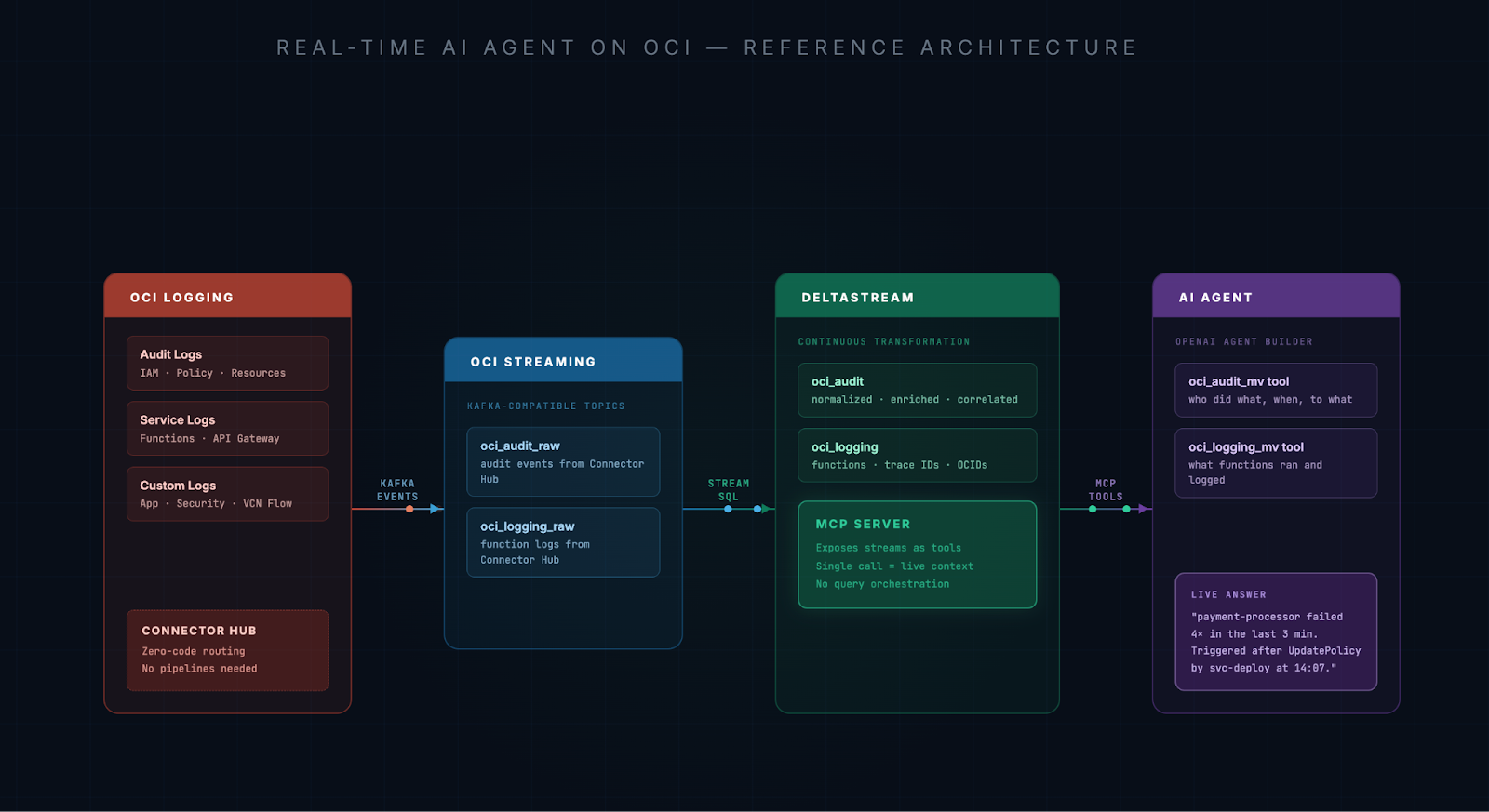
Each step does something specific.
OCI Logging and Connector Hub are already in place for most teams. Connector Hub routes your audit logs and service logs into OCI Streaming with no code required. It's a configuration, not a pipeline. If you haven't set this up, it takes about 15 minutes.
OCI Streaming receives those events as Kafka-compatible topics. This is where the data transitions from a queryable archive into a live, continuously flowing stream.
DeltaStream connects to OCI Streaming and continuously processes those events using SQL. It normalizes raw audit events, correlates them with function logs, resolves principal identities, extracts trace and span IDs, surfaces the resource OCIDs that were touched, and materializes all of it into clean streams that reflect what's actually happening in your tenancy right now.
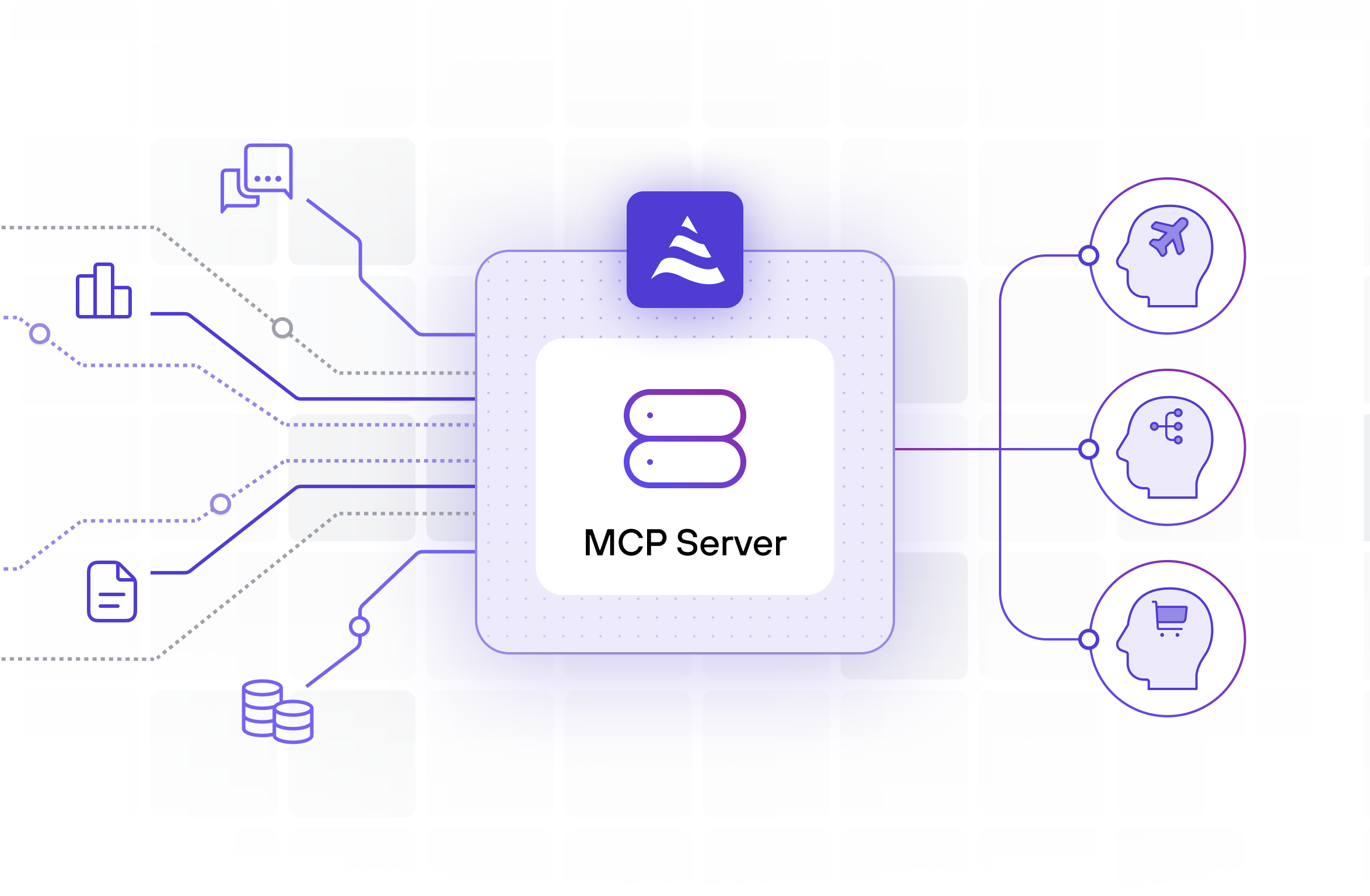
DeltaStream's built-in MCP server then exposes those streams as tools. Your agent doesn't orchestrate six API calls and hope they're consistent. It makes a single tool call and gets back a coherent, up-to-the-moment snapshot of operational reality.
The AI agent receives that context and does what LLMs are actually good at: reasoning, explaining, and recommending.
What the agent can actually answer
To make this concrete, the demo uses two streams derived from OCI Logging: one built from audit events, one from function invocations. We had an OCI engineer put it through its paces with their own infrastructure, and here are some of the questions they found most useful:
- "Check audit logs and report any delete or terminate operations related to this container instance in the last 24 hours, and show who initiated them"
- "Find any network-related changes — subnet, NSG, route table — that could affect this resource"
- "Detect if multiple automation sources are managing the same Container Instance"
- "Which resources were deleted in the last 4 hours and who performed those actions, including resource IDs"
- "Detect any privilege escalation or newly granted admin-level permissions"
What struck them most was traceability. Delete actions triggered indirectly through CLI or automation — the kind that normally look invisible in the console — were fully traceable. Who or what performed them, through what chain of events, was right there in the answer.
That's just a starting point. Your environment has its own logging topology, your own compartment structure, your own definition of what "something went wrong" looks like. The streams in the demo are a template, not a prescription. DeltaStream SQL gives you the flexibility to model your data however your use case requires.
Spinning up the agent is faster than you think
If you don't already have an AI agent, this is a good reason to build one. With OpenAI Agent Builder, the agent side is genuinely simple.
You define an agent, describe what it's for, and register DeltaStream's MCP endpoint as a tool provider. You tell the agent what tools are available (in this case the real-time oci_audit and oci_logging streams) and what each tool returns. That's it. The agent calls those tools when it needs operational context, and the MCP server handles delivering a live, correlated snapshot.
We used OpenAI Agent Builder for this demo because it has native MCP support and a clean interface for wiring up tool-calling agents. The same pattern works with any agent framework that supports MCP.
The full implementation, including Connector Hub configuration, DeltaStream SQL, MCP setup, and the agent definition, is in the DeltaStream examples GitHub repository. You can have this running in your own OCI environment in an afternoon
Why you can't just expose raw logs through MCP
Some teams will notice that there are already MCP servers for OCI, including ones that wrap the OCI Logging API. And that's true. You can give an agent the ability to query your logs on demand, and it will work in demos.
But querying is not streaming. When an agent calls the OCI Logging API at request time, it gets a snapshot of what the log index contains at that moment. It doesn't get a continuously enriched, correlated view so the agent still has to make multiple calls, each returning data from slightly different points in time. It still has to figure out how to join audit events with function logs, resolve principal identities, extract trace IDs, and correlate across services, and it has to do all of that work fresh for every single question it answers.
That's not a tooling problem. It's a model problem. You're asking the agent to be both a data engineer and a reasoning engine at the same time, on every request.
DeltaStream does the data engineering work once, continuously, before the agent ever runs. By the time a question comes in, the correlated, enriched context already exists. The agent just fetches it and thinks.
That's the difference between an agent that answers correctly under load and one that gets slower, more inconsistent, and harder to trust as your environment gets busier.
You're already most of the way there
The reason this reference architecture works for OCI teams is that OCI itself does most of the heavy lifting.
Your audit logs are already structured and timestamped. Your function logs are already flowing. Connector Hub can have both of them moving into OCI Streaming today, without writing a single line of custom code. DeltaStream connects to OCI Streaming the same way it connects to any Kafka-compatible broker and starts computing context immediately.
You're not starting a data project. You're activating data you already have and connecting it to agents that can actually use it. And the time your engineers currently spend correlating events, chasing audit trails, and answering "what happened?" questions across compartments? That time comes back.
Build the agent your OCI environment deserves
If you're running on OCI, the foundation is already there. The logs are flowing. The streaming infrastructure exists. The missing piece is connecting it to something that continuously makes sense of it and exposing that context to an agent that can act on it.
OCI Logging → Connector Hub → OCI Streaming → DeltaStream → MCP → Real answers, in real time.
If any of this resonated, the demo video shows the full setup in action and the GitHub repo has everything you need to try it in your own environment. The architecture is the same whether you're running a handful of functions or a sprawling multi-compartment tenancy. The streams just get richer.
And if you want to talk through how this fits your specific setup, we're easy to reach at deltastream.io.
Make real-time context your default. Make DeltaStream your Real-Time Context Engine.