26 Aug 2026

8 Min Read

Meet the Polymarket Intelligence Agent: Know What Changed Without Watching Everything

Polymarket never stops.

Markets heat up. Activity suddenly accelerates. Buying pressure turns into selling pressure. A market that looked quiet an hour ago can suddenly attract a wave of participants. A dramatic move can be supported by broad activity, or driven by only a handful of large participants.

All of that information is there.

The problem is figuring out what actually matters.

Today, we’re making the Polymarket Intelligence Agent publicly available for anyone to try, for free.

Try the agent → https://pm.deltastream.io/

If you use Polymarket regularly, the idea is simple: instead of trying to watch everything yourself, ask the agent what you need to know.

What if you could just ask Polymarket what changed?

Imagine opening Polymarket in the morning after being away for eight hours. There are markets everywhere. Prices have moved. Volume has changed. Thousands of transactions have happened.

Where do you start?

With the Polymarket Intelligence Agent, you can simply ask:

“What changed while I was away?”

Instead of giving you another list of popular markets, the agent can tell you that one market went from emerging buying pressure to sustained activity, another experienced a flow reversal, participation in a third suddenly broadened, and a fourth began showing unusual activity from wallets newly observed in the available history.

Or ask:

“What is waking up right now?”

The agent can find markets where activity is suddenly accelerating relative to their recent pace, then explain whether the activity is supported by increasing participation and persistent directional pressure.

Or perhaps you see a market exploding and ask:

“Is this actually a strong signal?”

The interesting answer may be: the activity is extremely strong, but the quality of the signal is low because most of it is concentrated among a small number of participants.

That distinction matters.

A traditional leaderboard can tell you what is big. This agent is designed to help explain what is changing, how it is changing, and how much confidence you should place in the structure of the observed activity.

Watch the Polymarket Intelligence Agent in action

https://youtu.be/FHtLeMErBXs

Polymarket doesn’t have a data problem

There is already an enormous amount of data available around Polymarket.

You can see markets, prices, volume, transactions, wallets and market metadata. There are dashboards, APIs, block explorers and analytics tools that expose more information than any individual could reasonably follow.

And that is exactly the problem.

Raw data is not context.

Suppose a trade arrives for a market. By itself, that trade doesn’t tell you very much.

To understand whether something meaningful is happening, you may need to know how much activity occurred over the last five minutes, how that compares with the last hour, whether activity is accelerating, whether buying or selling pressure has persisted across several time windows, how many wallets are participating, whether participation is expanding, whether a few large fills dominate the activity, and how the current behavior differs from what was happening before.

Now repeat that continuously across thousands of assets and participants.

The useful information isn’t contained in any single event.

It has to be computed from events over time.

And that is where this agent becomes fundamentally different from simply connecting an LLM to an API.

An AI agent shouldn’t reconstruct the world every time you ask a question

A common approach to building data-driven AI agents is to give the model tools for accessing raw data.

The user asks a question. The agent makes API or database calls. It retrieves records. Then it tries to figure out what those records mean.

That works surprisingly well for simple questions such as, “What is the current state of this market?”

It becomes much harder when the question is:

“What changed?”

Now the agent needs history.

Or:

“What is accelerating?”

Now it needs multiple time windows and comparisons.

Or:

“Is this move broad or concentrated?”

Now it needs to understand activity across participants.

Or:

“Which signals became stronger while I was away?”

Now it needs to reconstruct previous states, compare them with the current state, and determine which changes are meaningful.

You could ask an LLM to repeatedly assemble all of this from raw data at runtime. But now the model is spending its time and tokens trying to do the work of a streaming data system.

We think there is a better approach.

Compute the context continuously, then let the agent reason over it.

That is what DeltaStream does for the Polymarket Intelligence Agent.

The agent doesn’t start with raw events. It starts with understanding.

Behind the agent, DeltaStream continuously maintains fresh, time-aware context from Polymarket activity.

It isn’t waiting for someone to ask a question before figuring out what happened.

The context is already being maintained.

Activity across different time horizons is continuously computed. Acceleration is continuously updated. Directional flow is tracked. Participation breadth and concentration are maintained. Signal strength and signal quality are evaluated. Changes between previous and current states are preserved so that transitions such as emerging pressure, sustained activity and reversals can be identified.

So when you ask:

“What matters right now?”

the agent doesn’t need to start from a giant collection of transactions and reconstruct the answer.

The important context already exists.

The AI can do what AI is actually good at: understand your question, decide which context matters, reason over it and explain the result in language anyone can understand.

That difference, between retrieving raw data and providing fresh context, becomes increasingly important as agents take on more useful jobs.

Polymarket is just one example of a much larger category of AI agents


The Polymarket Intelligence Agent makes this problem especially easy to see because the world it observes changes constantly.

But Polymarket isn’t unique.

Consider a cybersecurity agent trying to answer, “What changed in our environment and what should I investigate?”

A payment operations agent trying to determine, “Which transactions are becoming risky or are likely to fail?”

A travel operations agent answering, “Which disruptions are getting worse and which customers are affected?”

A commerce agent deciding, “Which checkouts need intervention right now?”

In every case, giving the agent access to databases and APIs is only the beginning.

The agent needs current state, recent history and time-aware signals derived from constantly changing raw data.

We call this fresh data context.

For an important class of AI agents, fresh context isn’t an enhancement to the agent.

It’s what makes the agent useful.

Building that context shouldn’t require building an entire data platform

There is another side to this problem.

Building the Polymarket Intelligence Agent required much more than defining an AI prompt.

Someone has to continuously process incoming events, maintain state, calculate rolling windows, join changing datasets, preserve history, detect transitions, materialize the resulting context and make it available to the agent with the right access controls.

Traditionally, building that layer means assembling and operating multiple pieces of streaming and data infrastructure.

DeltaStream is designed to make that unnecessary.

With DeltaStream, teams can build the continuously updated context their agents need and expose that context directly to agents through DeltaStream’s built-in MCP server.

And we’re making the process even simpler with DeltaStream Agent.

Instead of requiring someone to become a streaming expert and manually write every data pipeline, you can describe the context you want in natural language. DeltaStream Agent can help generate the real-time pipelines needed to create and continuously maintain it.

You describe what the AI agent needs to know.

DeltaStream helps build the machinery that keeps that knowledge fresh.

That changes who can build these kinds of applications. A developer can move dramatically faster, and users who aren’t experts in streaming systems can begin creating sophisticated real-time context without first learning how to design and operate the underlying infrastructure.

The goal isn’t to make everyone a streaming engineer.

The goal is to make fresh context easy enough that every useful AI agent can have it.

Try the Polymarket Intelligence Agent

We built this agent because we wanted to demonstrate what an AI experience feels like when the model doesn’t have to discover the state of the world from scratch every time you ask a question.

Try asking it:

What should I pay attention to right now?

Then:

What is waking up?

Which signals are strong but fragile?

Where is participation broadening?

Are there any flow reversals?

Is unusual participant activity appearing anywhere?

And then come back later and ask:

“What changed while I was away?”

That last question captures what we believe is one of the biggest opportunities for AI agents.

The future isn’t just agents that can search data.

It’s agents that understand what is happening now, what happened before, what changed, and why that change matters.

That’s the experience fresh context makes possible.

And now you can try it yourself.

Try the Polymarket Intelligence Agent for free → https://pm.deltastream.io/

Want to build an agent like this for your own real-time data and use case?

DeltaStream can build the complete solution, from continuously maintained fresh context to the AI agent that uses it.

Build with DeltaStream → https://www.deltastream.io/contact-us/
11 Aug 2026

5 Min Read

DeltaStream Is Now Available on GoogleCloud: Fresh Context for AI Agents, Nowon GCP

We’re excited to announce that DeltaStream is now available on Google Cloud Platform (GCP).

This expands DeltaStream to teams building modern data applications and AI agents on Google Cloud, while also making DeltaStream Fusion available to GCP customers.

For AI developers, the impact is especially important.

LLMs are getting better at reasoning. Agent frameworks are getting easier to use. But for many production use cases, the biggest challenge isn’t the model, it’s giving the agent the right context at the right time.

An agent can only make a good decision if it understands what is happening now.

DeltaStream provides that missing layer.

Fresh Context for AI Agents on GCP

Many agents today retrieve raw data from databases, APIs, streams, and other systems every time a user asks a question.

That works for simple use cases.

But once an agent needs to understand changing conditions across multiple data sources, runtime data retrieval quickly becomes much more complicated.

The agent may need to:

  • Join information from multiple systems.
  • Determine which events are the latest.
  • Calculate rolling metrics and trends.
  • Track state across thousands or millions of entities.
  • Detect what changed in the last few seconds or minutes.
  • Make multiple tool calls before it can even begin reasoning.

Instead, DeltaStream continuously processes these data sources and maintains fresh, prebuilt context that is ready for the agent to use.

The architecture becomes much simpler:

Streaming + operational data → DeltaStream → Fresh Context → AI Agent

The agent can spend its tokens and reasoning capacity answering the question rather than rebuilding the data pipeline on every request.

Three Examples Where Fresh Context Changes the Agent

1. Payment and Fraud Operations Agent

Imagine an agent helping an operations team decide whether a payment should proceed.

The decision may depend on the customer, transaction history, merchant risk, recent account activity, payment attempts, fraud signals, and events that happened only seconds ago.

Pulling all of this independently at inference time makes the agent responsible for assembling a distributed data pipeline.

With DeltaStream, those signals can be continuously combined into a fresh payment context.

The agent receives the current situation and focuses on what it does best:

Reasoning about what happened, explaining the risk, and recommending the next operational action.

2. Security Operations Agent

A security agent investigating suspicious activity may need to understand recent login events, endpoint activity, identity information, historical behavior, alerts, and what changed across the environment in the last few minutes.

A static knowledge base is not enough.

And querying dozens of raw event sources during every investigation creates latency, complexity, and unnecessary context.

DeltaStream continuously transforms those signals into fresh security context so the agent can immediately answer questions such as:

What changed? Why is this suspicious? Which users or systems are affected? What should the analyst investigate next?

3. Real-Time Customer Operations Agent

Consider an agent responsible for helping customers when something goes wrong, an order fails, a shipment is delayed, a checkout is abandoned, or a service becomes unavailable.

The agent needs more than customer history.

It needs the current operational state:

What just happened?
What attempts have already been made?
Has the situation changed?
Are other systems experiencing the same problem?
What actions are still available?

DeltaStream maintains this continuously changing context so the agent can respond based on what is happening now, not what was true when data was last synchronized.

Beyond AI: DeltaStream Fusion on GCP

GCP availability also brings DeltaStream Fusion to Google Cloud customers.

Fusion enables teams to build and operate real-time data pipelines that continuously process, join, aggregate, and materialize streaming and operational data.

That same infrastructure can power:

  • AI-agent context
  • Operational dashboards
  • Real-time applications
  • Event-driven workflows
  • Streaming analytics

Organizations no longer need one architecture for real-time applications and another for AI.

The same continuously maintained data products can serve both.

The Missing Layer Between Your Data and Your Agents

Production AI agents need more than models and tools.

They need a way to continuously understand the changing state of the business.

That is the role DeltaStream is designed to play: build the fresh context once, continuously maintain it, and make it immediately available to every agent that needs it.

Now GCP teams can run that architecture directly in their Google Cloud environment.

Let Us Build Your First Fresh-Context Agent on GCP

You do not need to build the agent, design the real-time pipelines, or figure out how to connect everything together yourself.

DeltaStream can build the complete solution for you.

Bring us a use case where an AI agent needs fresh operational data, and our team will build the agent and the fresh-data context together as an end-to-end solution.

We can help you:

  • Connect the relevant streaming and operational data sources.
  • Design the fresh context the agent needs.
  • Build the real-time DeltaStream pipelines that continuously maintain that context.
  • Build and configure the AI agent that consumes it.
  • Connect the agent to the fresh context.
  • Deliver an end-to-end working solution you can demonstrate to your team and evolve toward production.

Instead of spending weeks figuring out the data architecture, context pipeline, agent tools, and integration points, you can start with the business problem.

You bring the use case. DeltaStream builds the agent and the fresh context behind it.

If you are building on GCP and have a use case involving transactions, customers, security events, operations, infrastructure, logistics, payments, or any other continuously changing data, we want to hear from you.

Let us build your first fresh-context agent on GCP.

Contact the DeltaStream team to schedule a demo or start an end-to-end GCP proof of concept.

19 Aug 2025

4 Min Read

Simplifying Analytics with DeltaStream Fusion

DeltaStream’s mission has always been to deliver a comprehensive stream processing platform that is both easy to use and operate. DeltaStream Fusion, our Unified Analytics Platform, brings together streaming, real-time, and batch analytics in a single integrated solution. It enables users to build high-performance streaming pipelines, create real-time materialized views directly from streaming data, and perform complex batch analytics on lakehouse data, all within one platform.

With Fusion, organizations can seamlessly manage diverse workloads, from real-time data ingestion for training applications and IoT analytics, to live dashboards and advanced batch analyses, without the complexity of stitching together multiple platforms or creating data silos.

Why We Built DeltaStream Fusion

DeltaStream began as a managed, serverless platform built around Apache Flink to process, govern and share streaming data. Typically, data is ingested into streaming storage systems and made available to downstream consumers, including data lakehouses—a common destination for streaming data. Often, data moves through multiple specialized systems: streamed data is processed by streaming platforms, stored in lakehouses, then queried by separate batch analytics engines. 

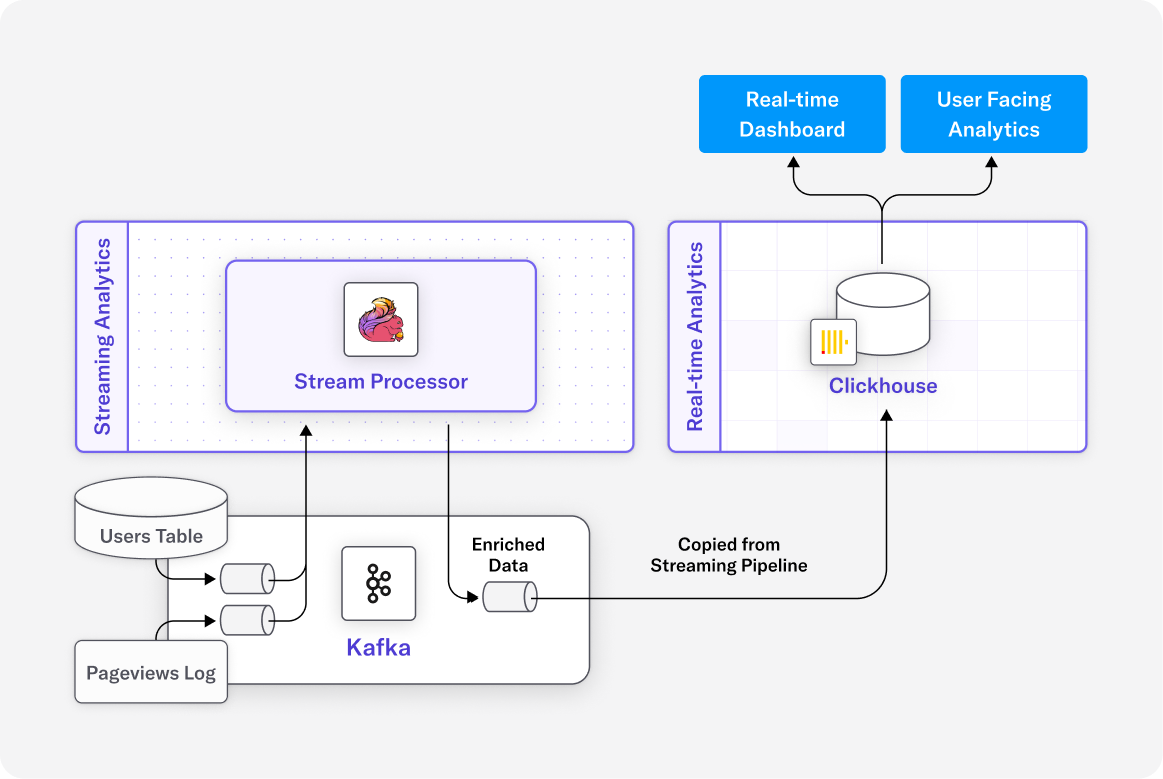
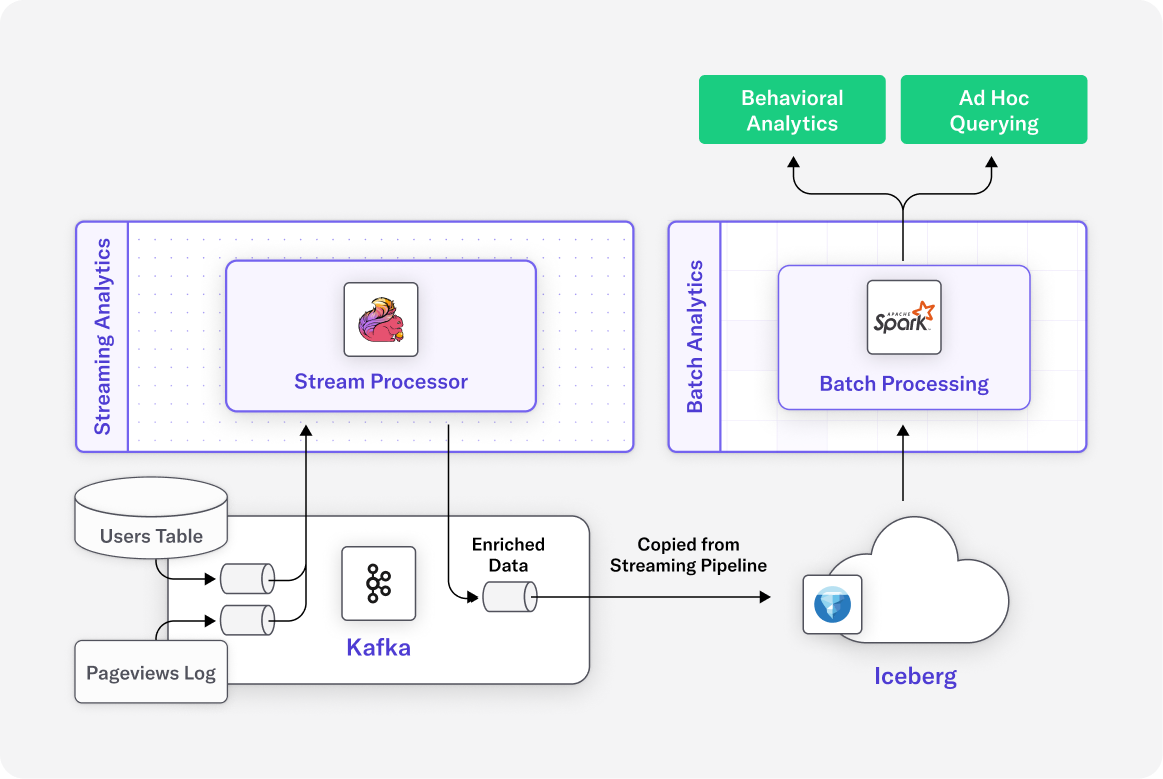
Consider the common example of clickstream analytics: weblog pageview events are enriched and aggregated via a streaming pipeline, then stored and analyzed separately within a lakehouse.

We see similar patterns of fragmentation in real-time analytics, where streaming data is stored in a real-time analytics database to power live dashboards or user-facing analytics.

A fragmented analytics landscape creates many inefficiencies. Managing separate analytics stacks for streaming, batch, and real-time workloads leads to:

  • Operational complexity, where each tool requires specialized knowledge, unique deployment methods, and dedicated infrastructure.
  • Redundant infrastructure costs, as organizations deploy multiple tools that often overlap in functionality.
  • Data duplication and synchronization issues, especially when trying to maintain consistency across disparate systems.
  • Governance and compliance challenges, as teams must enforce security and policy standards in multiple places, increasing the risk of errors or non-compliance.

A unified analytics platform capable of supporting all analytics workloads would address these challenges. This is the main motivation behind DeltaStream’s Fusion platform.

The Unified Analytics Advantage

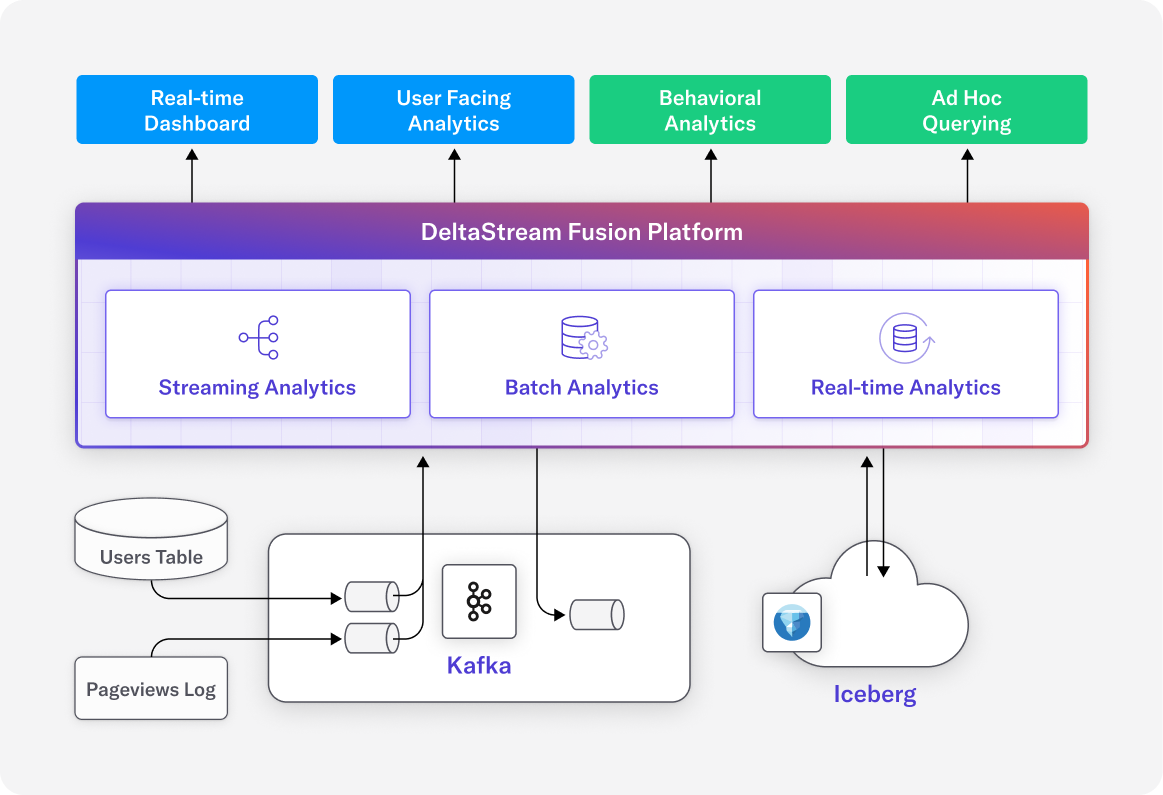
DeltaStream Fusion brings real-time, batch, and interactive analytics together in one seamless platform—so users can go from raw data to insights without jumping between tools.

With Fusion, teams can:

  • Build real-time streaming pipelines to prep data on the fly
  • Write that data to a lakehouse for long-term storage and deeper analysis
  • Instantly query and process both streaming and batch data—all within the same platform

Fusion also makes it easy to create real-time materialized views from streaming data, so you can deliver up-to-the-second insights to dashboards, applications, or end users—without ever leaving DeltaStream.

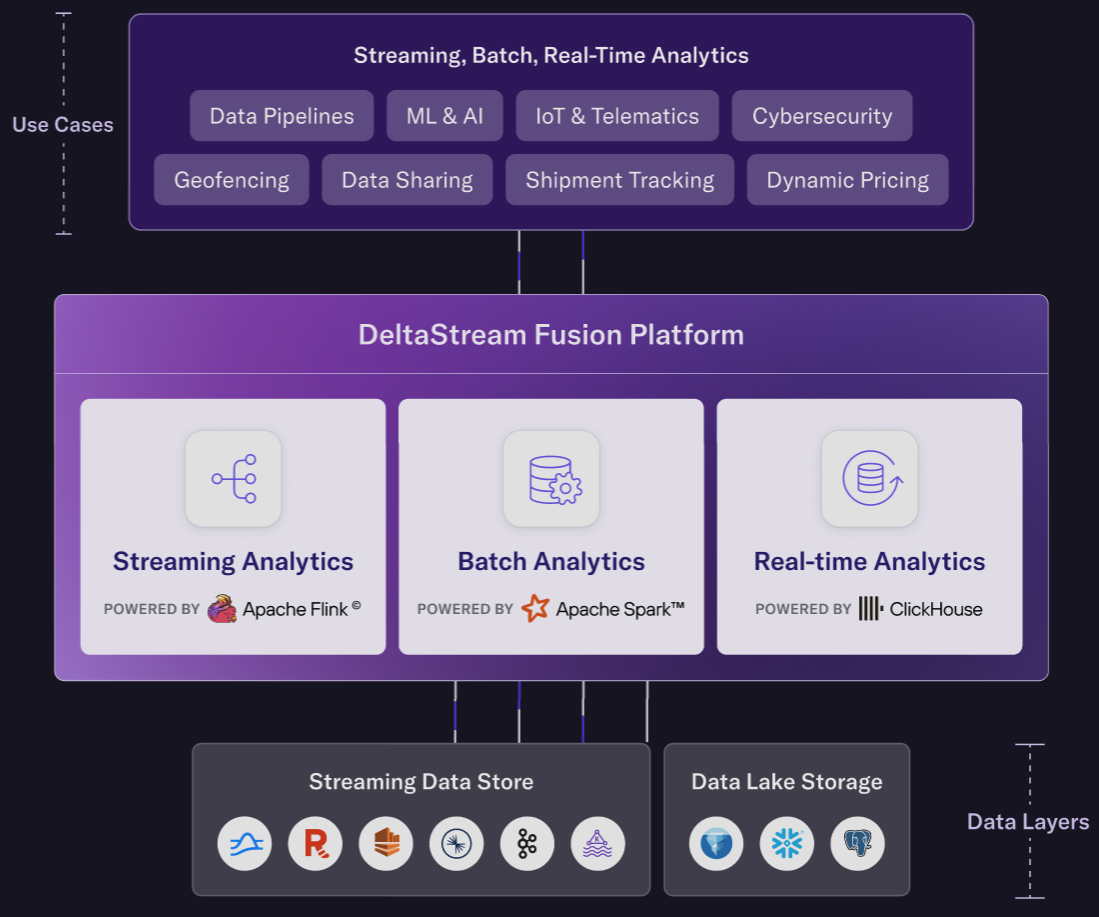
This unified architecture simplifies even the most complex analytics workflows. There’s no need to stitch together multiple systems or manage infrastructure. As a cloud-native, serverless solution, Fusion automatically chooses the best engine for the job:

  • Apache Flink for streaming
  • Apache Spark for batch
  • ClickHouse for low-latency queries

The diagram above shows how clickstream analytics flows through Fusion: streaming and lakehouse data are connected, processed, and queried—all in one place. Thanks to built-in real-time analytics capabilities, Fusion can deliver sub-second latency insights to power rich, responsive user experiences.

What You Can Do with DeltaStream Fusion

DeltaStream Fusion unlocks powerful analytics use cases across industries in one unified platform, without the complexity of managing separate tools or stitching together workflows.

Organizations can now build:

  • Real-time fraud detection systems that adapt as threats emerge
  • Predictive maintenance pipelines for IoT fleets based on live telemetry
  • Customer 360° analytics to personalize experiences with up-to-the-second insights
  • Financial analytics that blend real-time risk scoring with deep historical trend analysis

Moreover, businesses can deploy interactive dashboards powered by real-time materialized views, enabling instant insights for operational decisions. By integrating streaming, batch, and real-time querying together in one cohesive platform, DeltaStream Fusion gives data teams the agility to iterate faster, uncover deeper insights, and move from raw data to action in record time.

A Shift-Left in Analytics

Fusion also enables a critical shift in how organizations approach analytics—away from traditional batch-oriented platforms like Snowflake, Databricks, and Redshift, and toward continuous streaming as the default mode to process data. 

This shift brings major advantages:

  • Lower infrastructure and compute costs
  • Faster access to insights, reducing time-to-decision
  • Fewer data pipelines and systems to manage, cutting operational overhead

With native support for Apache Iceberg and seamless integration with platforms like Snowflake and Databricks, Fusion lets you unify batch and streaming into a single, governed pipeline—reducing duplication, maintaining consistency, and improving overall cloud efficiency.

Analytics doesn’t need to be fragmented. With DeltaStream Fusion, you can unify batch, streaming, and real-time analytics in one seamless platform, cutting costs, reducing complexity, and unlocking new possibilities. Curious how Fusion could simplify your workflows? Let’s talk.

23 Jun 2025

5 Min Read

Stream Smarter, Spend Less: Shift-Left with DeltaStream and Cut Snowflake Costs by 75%

Snowflake is one of the most powerful cloud data platforms available today. But as organizations increasingly rely on it to power business intelligence, AI, and real-time applications, many are discovering a costly tradeoff. Using Snowflake as the primary engine for all ELT (Extract, Load, Transform) processing can quickly balloon cloud spend.

Every Dynamic Table refresh, every intermediate table, and every downstream aggregation adds up—especially when data volumes or update frequencies grow.

This is why a growing number of modern data teams are shifting left to simplify streaming ETL and slash compute and storage bills.


Why Shift Left?

Most pipelines today follow an ELT model: extract raw data, land it in Snowflake, then transform it using tools like Dynamic Tables. While convenient, this pattern introduces hidden inefficiencies. You pay to store intermediate layers—often called Bronze and Silver tables—and rack up warehouse credits with every scheduled refresh. And because those transformations are tied to batch-based triggers, you’re often stuck waiting minutes (or longer) for updated insights.

DeltaStream offers a better way. By shifting left, teams can move from ELT to ETL, transforming data before it hits the warehouse. DeltaStream processes raw files as they land—cleaning, enriching, and aggregating them in motion. With just SQL, teams can build real-time pipelines that send only the final, analytics-ready results—Gold tables—into Snowflake. The result? A leaner, faster, and far more cost-effective architecture.

A Real-World Benchmark Using NYC Taxi Data


To prove the difference, we ran a 24-hour benchmark using NYC Yellow Taxi trip data. We tested two different pipeline strategies: one with Snowflake doing all the transformation work (ELT), and another where DeltaStream handled real-time transformations before the data reached Snowflake (ETL). In the Snowflake path, data landed in raw form and passed through multiple Dynamic Tables to get cleaned and enriched. Each table refreshed every minute, consuming compute resources even when no new data arrived. The result was a full transformation pipeline inside Snowflake—functional, but costly.

In the DeltaStream path, we ingested raw data directly from S3 into Kafka using a simple SQL statement. DeltaStream then joined and enriched the data in real time, skipping intermediate Silver tables altogether. Only the final Gold aggregates were streamed into Snowflake.

Ingest Once, Stream Forever


Both pipelines began by ingesting the same set of raw JSONL files dropped into an S3 bucket. 

  1. s3://aurora-demo-deltastream-e2e-s3-bucket/yellow-taxi/
  2. ├── yellow_taxi_2023-01.jsonl
  3. ├── yellow_taxi_2023-02.jsonl
  4. ├── ...
  5. └── taxi_zone_lookup.jsonl

Using DeltaStream, the ingestion process was automatic and serverless. New files were picked up as they landed, schemas were versioned and validated, and no custom Spark jobs or manual scripts were needed. In contrast to traditional batch jobs, the system was truly event-driven: ingest once, and the stream keeps flowing. Once data was ingested, we landed it into a Snowflake Bronze table using Snowpipe Streaming. 

  1. CREATE TABLE yt_2023_bronze
  2. WITH (
  3.   'store' = 'snow_bench', 
  4.   'snowflake.db.name' = 'DEMO_DB',
  5.   'snowflake.schema.name' = 'SNOW_BENCH'
  6. )
  7.  
  8. AS SELECT * FROM yellow_taxi_2023;

This stage was identical in both setups and created a consistent starting point. From there, however, the approaches diverged dramatically.

The Snowflake ELT Path: Functional but Expensive


Inside Snowflake, we used two Dynamic Tables to transform and enrich the data. One table cleaned the raw trip data and calculated basic metrics like trip speed. Another joined it with lookup tables to add zone and borough information. 

  1. SILVER_TAXI_CLEAN: cleans up trips, calculates mph
  2. SILVER_TAXI_ENRICHED: adds zone and borough names

Because Dynamic Tables refresh on a fixed schedule, these transformations ran every 60 seconds, regardless of whether new data had arrived.

Next, we built three additional Dynamic Tables for analytics: one for 15-minute zone aggregates, one for hourly borough stats, and one for daily top zones. While this delivered useful business insights, the cost of constantly running these transformations was substantial. 

The cost profile:

  • Warehouse Usage for Dynamic Table Refreshes: $17.72/day
  • Snowpipe Streaming: $0.16

    Compute was always on, and storage requirements grew with every new version of the Silver and Gold tables.

The DeltaStream ETL Path: Leaner, Faster, Cheaper


There were no intermediate Silver tables to maintain. No refresh schedules to manage. As soon as a new file landed in S3, DeltaStream loaded it into Kafka, ran the transformation, and streamed only the final Gold aggregates into Snowflake. 

  1. CREATE STREAM SILVER_TAXI_ENRICHED 
  2. AS
  3. SELECT *
  4. FROM yellow_taxi_2023 AS c
  5. JOIN yt_lookup_cl AS pu ON c.PULocationID = pu.LocationID
  6. ...

The cost profile:

  • Gold Table Storage: 0.64 MB
  • Warehouse Usage: $0.17 (initial load only)
  • Snowpipe Streaming: $0.40

This approach not only simplified the architecture, but eliminated unnecessary compute and storage costs.

Key Results: 75% Cost Savings!

Over 24 hours, we tracked compute and storage costs across both pipelines:

  • Snowflake storage (Silver tables = 371 MB vs Gold tables = .64MB)
  • Warehouse usage ($17.72 /day just for refresh vs $.17 for initial Gold table creation)
  • Snowpipe Streaming usage (.16 for ELT vs .4 for ETL )

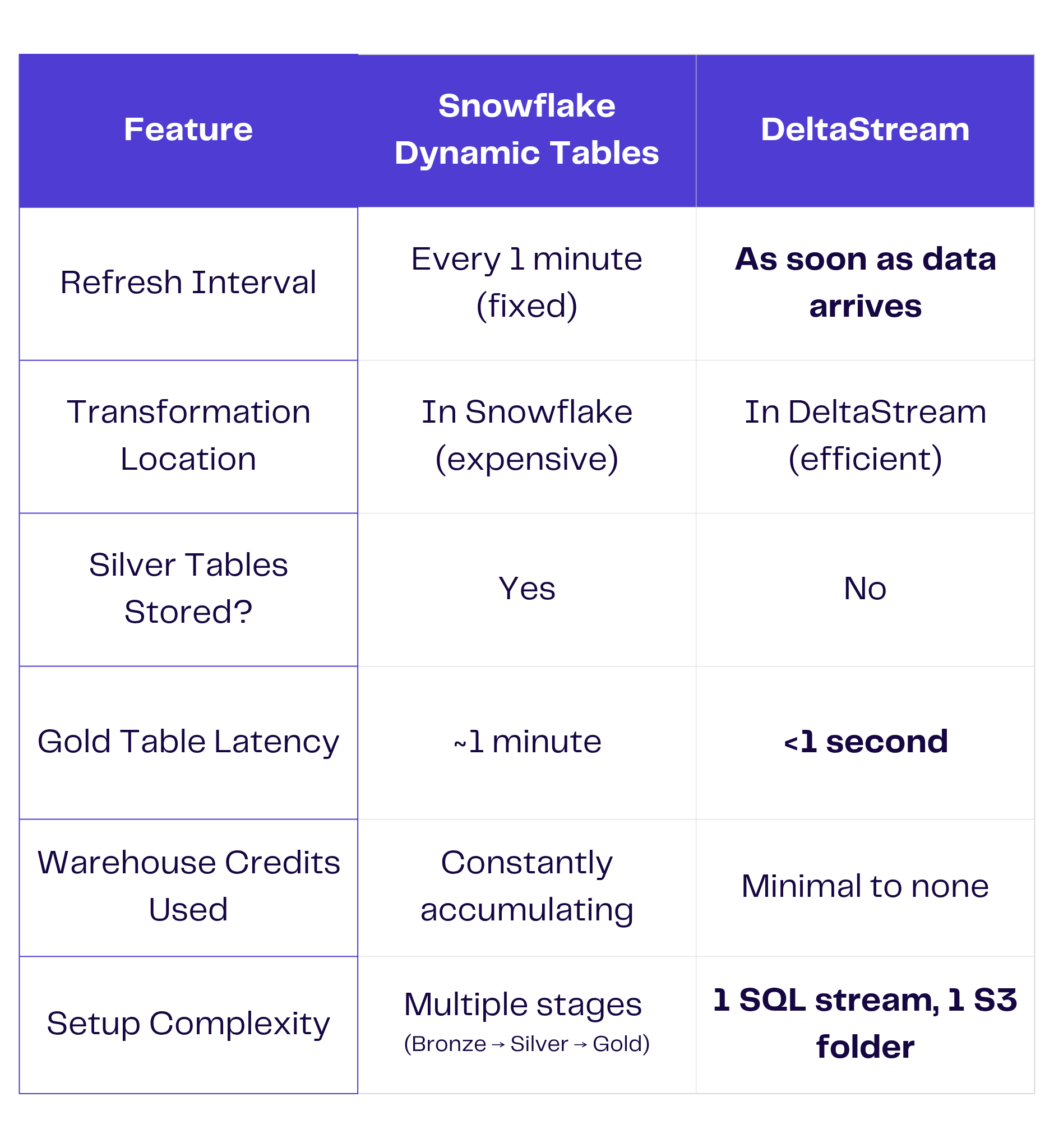
Key Difference: 1-Minute Dynamic Table Refresh vs. Real-Time Updates

DeltaStream vs Snowflake

The Bottomline: The Snowflake ELT path consumed 4x–10x more compute resources than DeltaStream, a cost savings of more than 75%.


Bonus Benefit: DeltaStream Simplifies Streaming with SQL


Perhaps the most surprising outcome? Simplicity. With DeltaStream, you don’t need to learn Java or wrestle with Flink SDKs. You write SQL, just like in Snowflake. There’s no need to manage watermarks, orchestrate batch windows, or worry about how stream processing frameworks handle state. DeltaStream takes care of all of that—giving you clean, governed, and real-time data with far less operational burden.

You get all the power of streaming ETL—without the learning curve.

The Takeaway: Shift Left and Save Big


This benchmark confirms what many data teams are already realizing: doing everything inside Snowflake might be simple, but it’s not always efficient. With DeltaStream, you can reduce compute and storage costs, shrink latency, and streamline your architecture—all while using familiar SQL.

Shift left. Get fresher data. Cut your Snowflake bill. Stream smarter—with DeltaStream.


Want to see how much we can save you on your Snowflake bill?


Contact us for a complimentary stream assessment with DeltaStream CEO Hojjat Jafarpour.
We’ll evaluate your current architecture, identify quick wins, and deliver a custom action plan to reduce costs, simplify pipelines, and accelerate time to insight.

04 Jun 2025

2 Min Read

DeltaStream Fusion is Now Generally Available: Unify All Your Analytics in a Single Platform!

We are thrilled to announce the General Availability (GA) of DeltaStream Fusion, our Unified Analytics Platform! With DeltaStream Fusion, enterprises can simplify data infrastructure, lower compute costs, and accelerate insights from all data—from the fastest real-time streams to the deepest historical batches.

From Fragmentation to Fusion

Today’s businesses require real-time intelligence, but traditional fragmented analytics architectures make this challenging and costly. Separate tools for streaming, batch, and real-time analytics create operational complexity, redundant infrastructure costs, data duplication, and governance issues.

ADeltaStream Fusion eliminates these silos, offering a single powerful, serverless platform that seamlessly integrates:

  • Streaming Analytics: Leverage Apache Flink to instantly process, transform, and analyze data.
  • Batch Processing: Utilize Apache Spark for scalable, historical data analysis.
  • Real-Time Querying: Deliver blazing-fast query performance with ClickHouse, power live dashboards and applications.

Integrations

DeltaStream Fusion natively integrates with many solutions such as Apache Iceberg, Postgres and Apache Kafka, ensuring a consistent, performant lakehouse experience.

What are benefits of Unified Analytics?

Data teams can use DeltaStream Fusion to:

Accelerate Time to Insights: Detect anomalies, personalize experiences, and respond to business events in milliseconds, not hours.

Simplify Data Stack: Consolidate tools, reduce maintenance overhead, and free up valuable engineering resources.

Empower Teams: Provide a unified SQL interface and powerful capabilities, enabling data engineers, analysts, and scientists to collaborate seamlessly.

Innovate with Confidence: Build advanced applications like real-time fraud detection, predictive IoT maintenance, and dynamic customer analytics.

DeltaStream Fusion in Action: Live at Snowflake and Databricks Summits!

Are you attending Snowflake Summit? Maybe you’re headed to the Databricks Data&AI Summit? Don’t miss your chance to see DeltaStream Fusion’s powerful capabilities firsthand! Our team is on-site, ready to demonstrate how you can unify your real-time and batch data pipelines and accelerate your analytics.

Get a live demo of DeltaStream Fusion and speak directly with our experts. Schedule a dedicated meeting to discuss your specific data challenges and how Fusion can help by heading to our contact us page.

We’re excited to show you how DeltaStream Fusion seamlessly complements your Snowflake environment to deliver a truly unified data experience.

Ready to transform your data strategy?

Request a Personalized Demo. The future of analytics is unified, and DeltaStream Fusion is leading the way. Discover how simple, powerful, and cost-effective unified analytics can be.

We are excited for you to discover the full potential of DeltaStream Fusion and look forward to the amazing innovations you will build!

06 Jan 2025

4 Min Read

DeltaStream: Looking Back at 2024

2024 was a pivotal year for DeltaStream of unprecedented growth and technological breakthroughs. Our journey is defined by relentless innovation, strategic advancements, and an unwavering commitment to creating the best stream processing for data teams. Central to this mission has been our vision to help organizations shift left in their analytics—transforming data as it streams in rather than relying on traditional Extract-Load-Transform (ELT) workflows.

As we reflect on the past year, we’re excited to share the milestones that have not only shaped our trajectory but have also reinforced our core mission of making stream processing more accessible, intuitive, and powerful. The following highlights capture the essence of our transformative year:

Raising our Series A

In September, we secured $15M in Series A funding from New Enterprise Associates (NEA), Galaxy Interactive, and Sanabil Investments. This brings our total raised to $25M and will accelerate DeltaStream’s vision of providing a serverless stream processing platform to manage, secure, and process all streaming data. We are excited to have NEA, Galaxy Interactive, and Sanabil Investments as partners on this journey!

Expanding Expertise

This year, we welcomed two additions to our team, including a Developer Advocate and Head of Product Marketing. These two additions will help us bring the best product possible to streaming data teams. We are also currently expanding our engineering team; you can apply here and join our team!

Enhancing our User Interface

This year, we made a series of updates to our user interface (UI) based on user feedback. These changes are tailored to streamline real-time data processing and management, making monitoring, managing, and interacting with the platform easier. We partnered with Greydient Lab to bring our users a robust yet simplified platform to better manage data streams. Take a look at a detailed account of everything we improved upon in our UI.

Engineered for Ease

2024 saw the release of many exciting capabilities by DeltaStream. We launched our API v2, which includes GO and Typescript drivers for our DeltaStream API. Additionally we added a Terraform provider and self-served private link support for MSK, along with an ever-improving SQL syntax. This coming year we have many more improvements on our roadmap that we are looking forward to sharing.

Enriching Integrations

Our goal has always been to find ways to serve more users, wherever their data may be. This year we joined the Confluent Partner Program and added the Confluent Kafka store to our platform. Additionally, thanks to user feedback we also added Postgres as a data store. We plan to continually add more data stores to our system so you can bring all your data into motion, wherever it may be.  

Widening our Availability

We’ve made it even easier to start stream processing by opening up our platform to an instant 14 day free trial. It’s important to us that users can easily get into our platform and start writing queries in minutes. In keeping with ease of accessibility, we are also in the AWS marketplace making it simple for AWS customers to purchase and start using DeltaStream.

Made Updates to our Open Source Contributions

Recognizing the power of collaboration, we open-sourced our Snowflake connector for Apache Flink in 2023. This connector facilitates native integration between other data sources and Snowflake. Open sourcing this connector aligns with our vision of providing a unified view over all data and making stream processing possible for any product use case. We also made updates and improvements to the connector in 2024, in keeping with our commitment to the Apache Flink community.

Bundle Queries Applications

To make stream processing simpler, more efficient, and more cost effective, we wanted the capability of combining multiple statements together. We did this by creating a new feature called Applications which simplifies workloads, reduces the load on stores, and reduces overall execution cost and latency.

Engaging the Community

We actively participated in various conferences and events, including Current, Databricks: DATA+ AI Summit, AWS reInvent, and numerous data industry gatherings. We hosted a special networking event at Current with our partners RedPanda, Clickhouse, and Conduktor. This year we also began conducting monthly webinars and showcased DeltaStream to the broader community. Thank you to everyone we met and connected with this year!

Looking Ahead

Looking ahead to 2025, our vision remains clear and ambitious. We are dedicated to pushing the boundaries of stream processing and making sophisticated data technologies accessible to teams of all sizes and complexity.

To everyone who has been part of our journey—our customers who trust us with their most critical data needs, our partners who challenge us to innovate, and our community who inspire us every day—we extend our deepest gratitude. Together, we are not just transforming data; we are creating a more responsive, intelligent, and data-driven future.

19 Nov 2024

3 Min Read

Introducing DeltaStream’s New User Interface for Enhanced Stream Processing

We are excited to announce a series of updates to our user interface (UI) for DeltaStream, designed to improve usability, efficiency, and functionality. These changes are tailored to streamline real-time data processing and management, making monitoring, managing, and interacting with the platform easier for users. We partnered with Greydient Lab to bring our vision of a complete and simplified platform to life.  Here’s a look at what’s new:

Enhanced Dashboard for Real-Time Insights

We’ve revamped the dashboard to give users an at-a-glance overview of their ongoing work. You can now easily check the number of queries running, the status of your data stores, and other key metrics without diving deep into different sections. This enhancement allows for faster decision-making and better system management.

New Query Status Bar for Easier Error Tracking

To help users manage their streaming queries, we’ve added a query status bar at the top of the navigation. This feature makes it easy to quickly check for errors or issues, ensuring that problems can be resolved before they impact your data pipelines.

Detailed Activity Logs for Admins

For security and user management, we’ve introduced activity logs specifically for Security Admin and User Admin roles. This feature provides a comprehensive view of actions taken within the organization, giving admins greater control and visibility over their environment.

Centralized Resources Page

We’ve created a new Resources page where the most important objects are gathered for easier management. This consolidation allows users to access and manage key resources quickly without navigating through multiple menus or screens.

Integration Management Page

The new Integration page simplifies external integration management. Whether connecting to third-party data sources or adding external tools, you now have a centralized location to handle all your integrations.

Enhanced Workspace for Streamlined Workflows

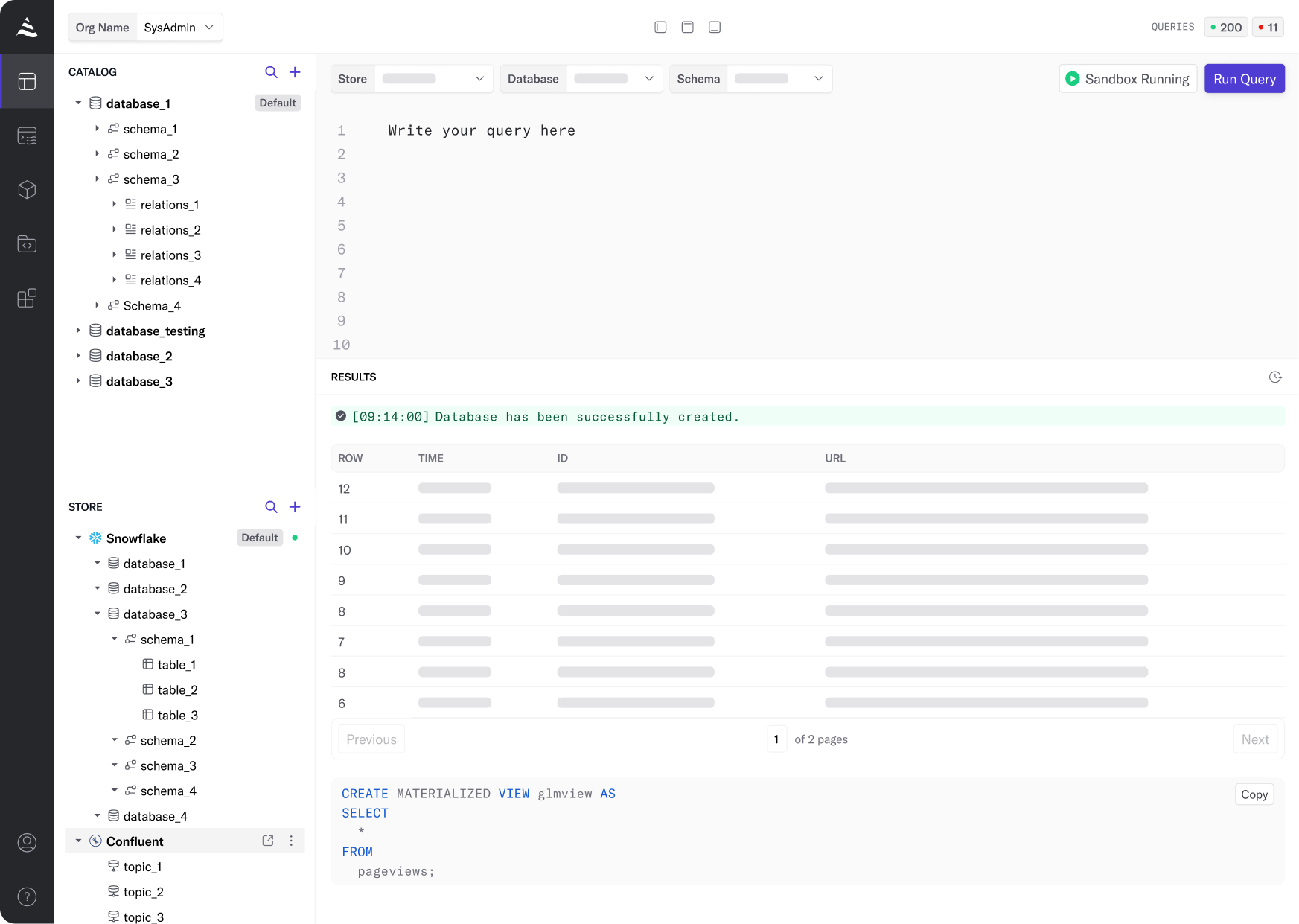
The workspace has been redesigned to include all essential sections—file explorer, SQL editor, result, and history—on a single page. This allows users to work more efficiently, with everything they need in one view.

  • Customizable Workspace: You can toggle on or off specific sections like the file explorer, SQL editor, or result pane to focus on the parts of the workspace that matter most at any given time.
  • File Explorer Improvements: The file explorer now enables users to directly check each data store or database without navigating away from the workspace, reducing time spent moving between pages.

Revamped Query Page

Our new Query page now includes overview information and detailed query metrics. This gives users more profound insights into their queries, helping to optimize performance and better understand the behavior of their data pipelines.

Conclusion

These UI updates make real-time stream processing more intuitive, secure, and efficient. We believe these changes will help users streamline their workflows, reduce errors, and better manage their data streams. Stay tuned as we continue to improve the platform and provide you with the best tools for real-time data processing. Try it for yourself – sign up for a free 14-day trial of DeltaStream.

06 Nov 2024

4 Min Read

Open Sourcing our Snowflake Connector for Apache Flink

November 2024 Updates:

At DeltaStream our mission is to bring a serverless and unified view of all streams to make stream processing possible for any product use case. By using Apache Flink as our underlying processing engine, we can leverage its rich connector ecosystem to connect to many different data systems, breaking down the barriers of siloed data. As we mentioned in our Building Upon Apache Flink for Better Stream Processing article, using Apache Flink is more than using robust software with a good track record at DeltaStream. Using Flink has allowed us to iterate faster on improvements or issues that arise from solving the latest and greatest data engineering challenges. However, one connector that was missing until today was the Snowflake connector.

Today, in our efforts to make solving data challenges possible, we are open sourcing our Apache Flink sink connector built for writing data to Snowflake. This connector has already provided DeltaStream with native integration between other sources of data and Snowflake. This also aligns well with our vision of providing a unified view over all data, and we want to open this project up for public use and contribution so that others in the Flink community can benefit from this connector as well.

The open-source repository will be open for contributions, suggestions, or discussions. In this article, we touch on some of the highlights of this new Flink connector.

Utilizing the Snowflake Sink

The Flink connector uses the latest Flink Sink<InputT> and SinkWriter<InputT> interfaces to build a Snowflake sink connector and write data to a configurable Snowflake table, respectively:

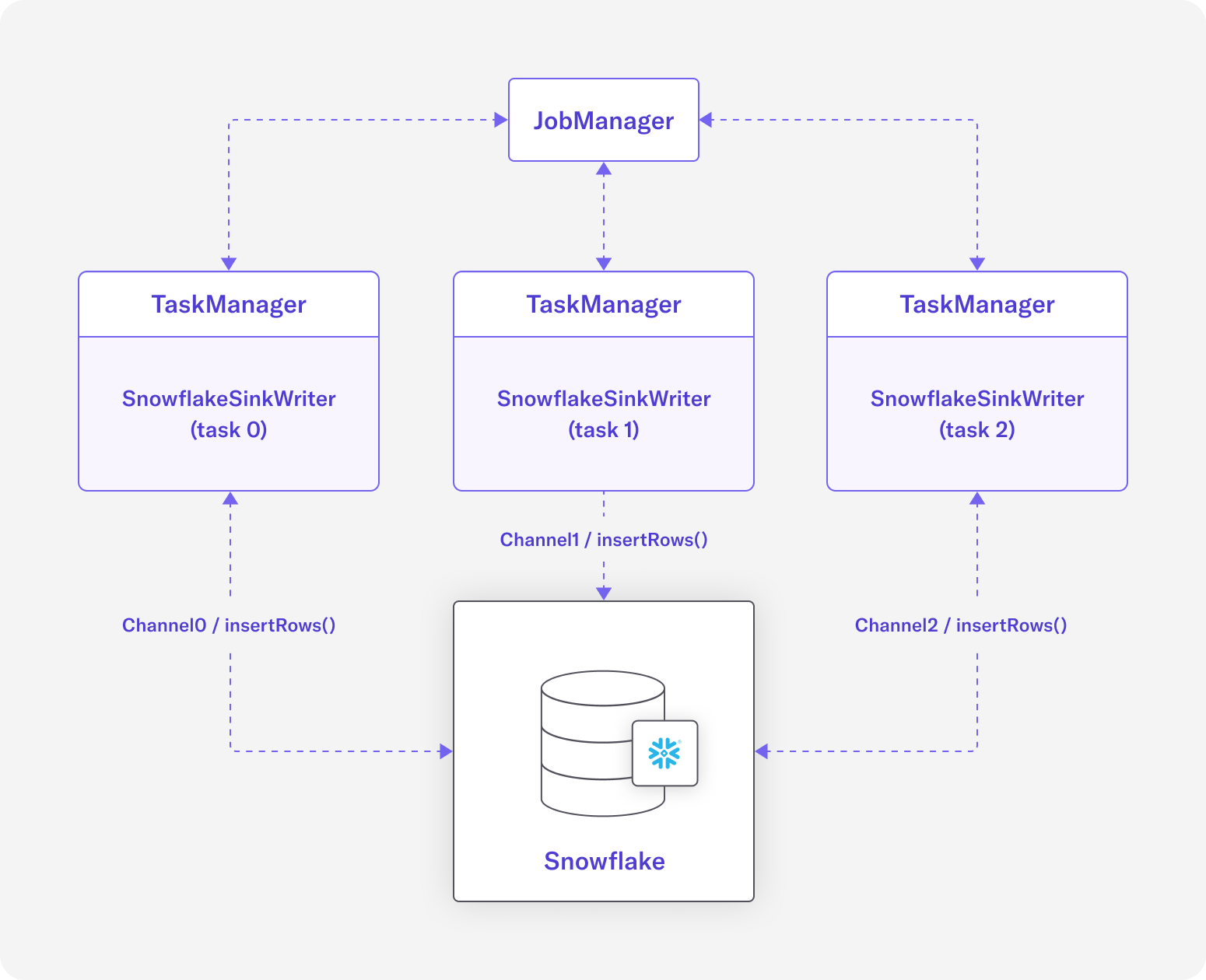
Diagram 1: Each SnowflakeSinkWriter inserts rows into Snowflake table using their own dedicated ingest channel

The Snowflake sink connector can be configured with a parallelism of more than 1, where each task relies on the order of data it receives from its upstream operator. For example, the following shows how data can be written with parallelism of 3:

  1.  
  2. DataStream<InputT>.sinkTo(SnowflakeSinkWriter<InputT>).setParallelism(3);

Diagram 1 shows the flow of data between TaskManager(s) and the destination Snowflake table. The diagram is heavily simplified to focus on the concrete SnowflakeSinkWriter<InputT>, and it shows that each sink task connects to its Snowflake table using a dedicated SnowflakeStreamingIngestChannel from Snowpipe Streaming APIs.

The SnowflakeSink<InputT> is also shipped with a generic SnowflakeRowSerializationSchema<T> interface that allows each implementation of the sink to provide its own concrete serialization to a Snowflake row of Map<String, Object> based on a given use case.

Write Records At Least Once

The first version of the Snowflake sink can write data into Snowflake tables with the delivery guarantee of NONE or AT_LEAST_ONCE, using AT_LEAST_ONCE by default. Supporting EXACTLY_ONCE semantics is a goal for a future version of this connector.

The sink writes data into its destination table after buffering records for a fixed time interval. This buffering time interval is also bounded by Flink’s checkpointing interval, which is configured as part of the StreamExecutionEnvironment. In other words, if Flink’s checkpointing interval and buffering time are configured to be different values, then records are flushed as fast as the shorter interval:

  1.  
  2. StreamExecutionEnvironment env = StreamExecutionEnvironment.getExecutionEnvironment();
  3. env.enableCheckpointing(100L);
  4. SnowflakeSink<Map<String, Object>> sf_sink = SnowflakeSink.<Row>builder()
  5. .bufferTimeMillis(1000L)
  6. .build(jobId);
  7. env.fromSequence(1, 10).map(new SfRowMapFunction()).sinkTo(sf_sink);
  8. env.execute();

In this example, the checkpointing interval is set to 100 milliseconds, and the buffering interval is configured as 1 second.  This tells the Flink job to flush the records at least every 100 milliseconds, i.e., on every checkpoint.

Read more about Snowpipe Streaming best practices in the Snowflake documentation.

We are very excited about the opportunity to contribute our Snowflake connector to the Flink community. We’re hoping this connector will add more value to the rich connector ecosystem of Flink that’s powering many data application use cases.If you want to check out the connector for yourself, head over to the GitHub repository. Or if you want to learn more about DeltaStream’s integration with Snowflake, read our Snowflake integration blog.

The Road to Raising DeltaStream’s Series A

DeltaStream has secured $15M Series A funding

Today, I’m excited to announce DeltaStream has secured $15M Series A funding from New Enterprise Associates(NEA), Galaxy Interactive, and Sanabil Investment. This brings our total raised to $25M and will accelerate DeltaStream’s vision of providing a serverless stream processing platform to manage, secure and process all streaming data. 

The Beginnings of Our Story

I joined Confluent in 2016 because I was given the opportunity to build a SQL layer on top of Kafka so users could build streaming applications in SQL. ksqlDB was the product we created, and it was one of the first SQL processing layers on top of Apache Kafka. While ksqlDB was a significant first step, it had limitations. Including being too tightly coupled with Kafka, only working with one Kafka cluster, and creating a lot of network traffic on Kafka cluster. 

The need for a next-generation stream processing platform was obvious. It had to be a completely new platform from the ground up, so it made sense to start from scratch. Starting DeltaStream was the beginning of a journey to revolutionize the way organizations manage and process streaming data. The challenges we set out to solve for were:

  1. Easy of use: Writing SQL queries is all a user should worry about
  2. Have a single data layer to process/analyze all streaming and batch data, including, for example, data from Kafka, Kinesis, Postgres, and Snowflake
  3. Standardize and authorize access to all data
  4. Enable high-scale and resiliency
  5. Flexible deployment models

Building DeltaStream

At DeltaStream, Apache Flink is our processing/computing engine. Apache Flink has emerged as the gold standard platform for stream processing with proven capabilities and a large and vibrant community. It’s a foundational piece of our platform, but there’s much more. Here is how we solved the challenges outlined above:

Ease of use

We have abstracted away the complexities of running Apache Flink and made it serverless. Users don’t have to think about infrastructure and can instead focus on writing queries. DeltaStream handles all the operations, including fault tolerance and elasticity.

Single Data Layer

DeltaStream can read across many modern streaming stores, databases, and data lakes. We then organize this data into a logical hierarchy, making it easy to analyze and process the underlying data. 

Standardize Access

We built a governance layer to manage access through fine-grain permissions across all data rather than across disparate data stores. For example, you would manage access to data in your Kafka clusters, Kinesis streams all within DeltaStream.

Enable High Scale and Resiliency

Each DeltaStream query is run in isolation, eliminating the “noisy neighbor” problem. Queries can be scaled up/down independently.

Flexible Deployment Models

In addition to our cloud service, we provide BYOC for companies that want more control of their data. This is essential for highly regulated industries and companies with strict data security policies. 

Also, with DeltaStream, we wanted to go beyond Flink and provide a full suite of analytics by enabling users to build real-time materialized views with sub-second latency. 

What’s next for DeltaStream

We’re just getting started. Here are a few things we’re planning:

  • Increase the number of stores we can read and write to. This includes platforms such as Apache Iceberg and Clickhouse.
  • Increasing the number of clients/adaptors we support, including dbt and Python.
  • Multi-Cloud
  • Leverage AI to enable users with no SQL knowledge to interact with DeltaStream

If you are a streaming and real-time data enthusiast and would like to help build the future of streaming data, please reach out to us; we are hiring for engineering and GTM roles!

If you want to experience how DeltaStream enables users to maximize the value of their streaming data, try it for yourself by heading to deltastream.io.

Finally, I would like to thank our customers, community, team, and partners—including our investors—for their unwavering support. Together, we are making stream processing a reality for organizations of all sizes.

14 May 2024

2 Min Read

DeltaStream Joins the Connect with Confluent Partner Program

We’re excited to share that DeltaStream has joined the Connect with Confluent technology partner program.

Why this partnership matters

Confluent is a leader in streaming data technology, used by many industry professionals. This collaboration enables organizations to process and organize their Confluent Cloud data streams easily and efficiently from within DeltaStream. This breaks down silos and opens up powerful insights into your streaming data, the way it should be.

Build real-time streaming applications with DeltaStream

DeltaStream is a fully managed stream processing platform that enables users to deploy streaming applications in minutes, using simple SQL statements. By integrating with Confluent Cloud and other streaming storage systems, DeltaStream users can easily process and organize their streaming data in Confluent or wherever else their data may live. Powered by Apache Flink, DeltaStream users can get the processing capabilities of Flink without any of the overhead it comes with.

Unified view over multiple streaming stores

DeltaStream enables you to have a single view into all your streaming data across all your streaming stores. Whether you are using one Kafka cluster, multiple Kafka clusters, or multiple platforms like Kinesis and Confluent, DeltaStream provides a unified view of the streaming data and you can write queries on these streams regardless of where they are stored.

Break down silos with secure sharing

With the namespacing, storage abstraction and role based access control, DeltaStream breaks down silos for your streaming data and enables you to share streaming data securely across multiple teams in your organizations. With all your Confluent data connected into DeltaStream, data governance becomes easy and manageable.

How to configure the Confluent connector

While we have always supported integration with Kafka and continue to do so, we have now simplified the process for integrating with Confluent Cloud by adding a specific “Confluent” Store type. To configure access to Confluent Cloud within DeltaStream, users can simply choose “Confluent” as the Store type while defining their Store. Once the Store is defined, users will be able to share, process, and govern their Confluent Cloud and other streaming data within DeltaStream.

To learn how to create a Confluent Cloud Store, either follow this tutorial or watch the video below.

Getting Started

To get started with DeltaStream, schedule a demo with us. You can also learn more about the latest features and use cases on our blogs page.

alert-icon

Please enter a valid email address.

Request Submitted

Thank you for requesting a demo.
You will receive your login information to your email soon.